Nov 30, 2023

LED Tone Tree PCB

This is my second attempt at a tree shaped PCB for my learn to solder classes. This one uses regular through-hole LEDs instead of the surface mount Neopixels I used in the first design. I again used an ATtiny85 MCU on this board. To get 12 LEDs flashing independently with so few pins I had to use the "Charlieplex" technique. I again found my inspiration over on the Technoblogy website for the LEDs and the buzzer music. I had to do a little work on the timers to get the combined code to work together but it turned out well. 


This will be a nice board for my "Learn to Solder" classes. I went with USB power (the cord costs less than batteries) and 3D printed stands to display the finished board. The PCB files and code can be found on oshwlab.com

I did a few videos on the design. Here is the playlist.

Feb 8, 2023

Neopixel Tone Tree PCB

 I needed a new board for my Winter learn to solder classes so I thought I would do Christmas buzzer music and blinking pixels on a fir tree shaped PCB. After adapting code from a Technoblogy project I was able to port over to the ATtiny85 five songs from the Uno and still have room to get the Tiny Neopixel library to blink 15 pixels. This is the first time I have tried the SK6812 mini-E reverse mounted pixels. I know they are kind of small but I thought the tabs might make them relatively easy to solder by hand. The boards turned out well.


The only problem was I do not feel it is suitable for the learn to solder class because of the small neopixels. I will probably solder up the 10 boards I got and give them as gifts. Stay tuned for a version 2 that will have buzzer music and regular LEDs.

I did 3 videos on how I designed this. Here is the playlist

Mar 29, 2022

Purple LED follower

 I had some time to play with some circuit designs and found this fun LED follower circuit using a 555 timer and a 4017 decade counter IC. I had never used this IC before and saw a similar circuit online and wanted to see how it works. Basically it has output pins for 0 to 9. A clock pulse increments which of the 10 pins is high. I am only using 8 of the 10 outputs on the 4017 with #8 (9th pin) tied to the reset pin which resets the chip back to pin 0 being high. The IC has an overflow pin which goes high on rollover so you could cascade several of these chips to count 10s, 100s, 1000s.  


To keep it simple I made a fixed frequency on the 555 timer. Since only one LED lights at a time I tied all LED cathodes (-) together and wired it to ground through one 220 ohm resistor.

I got 10 boards from JLCPCB for $5 plus $20.14 shipping. The components total less than $1 per board so total per board is less than $3.50. It is hard to tell from the photo but I tried the new purple board color JLCPCB offers. It looks great.

You can see the public domain files at https://oshwlab.com/lohmeyer.keith/heart-follower

Jan 5, 2021

Greenhouse Controller Project

 We have 2 commercial greenhouse ranges on our farm. Each range is 1/2 acre gutter connected with a 12 ft. tall clear span of 120 ft. x 180 ft. Both ranges are 20+ years old and still in good working order. These ranges have environmental controls from Wadsworth Control Systems. The model Step500 controls have done a great job controlling the temperature and humidity through the years. The heart of the controller is the main board shown below.

Ten or so years ago we had a control board with problems so we bought a $900 replacement and had the bad board repaired and sent back for use as a spare. That was our only failure until last Spring (2020) when another board failed so I swapped it for the spare. I called Wadsworth to see about repairing a board again and was told that the Step500 was at "end of life" and they were not repairing or replacing the boards. I was advised to let them to design and quote a new system based on their newer controllers. I could not get a price over the phone but was told $3000 - $5000 would be in the ballpark. I still had 2 working controllers but knew something had to be done. 

With the Covid19 health crisis I had more time on my hands than I had money. Using the controller for 20 years I knew how it worked. The board in question basically controlled relays for 3 stages of heating, controlling 6 unit heaters and the relays for 5 stages of cooling, controlling contactors for the 10 - 1hp fans as well as position control of the vent wall. The board received temperature and humidity readings from a wired senor box in the middle of the range. 

I decided to get to work on this project. After about 120 hrs. of my time over several months I had the new system up and running. Since you have to get 5 boards made I decided to get 5 sets of all the parts as well. This will let me upgrade the second range as well once the first one finishes a shake down season and I will still have plenty of spare parts for the foreseeable future. The total cost of 5 complete systems was $450 or $90 per system. I wrote up a separate page going deeper into the decisions I had to make. I ended up with one large PCB and two smaller ones.


I consider this project a great success. It is a good feeling to be able to extend the life of this controller. It is not often for a hobby project to save you money but this one sure did. I would be happy to answer any questions on the project.

Dec 4, 2020

Nano Pogo Programing Fixture

 Up until recently I have had good luck with Nano clones that use the CH340 drivers. I guess my luck ran out when I ordered 10 of them from EBay for $2.10 each. Even choosing the "old bootloader" did not get them loading code consistently. I already had a Sparkfun Tiny Programmer for my ATtiny projects so I wired up a 2x3 Dupont cable to fit the ICSP pins on the Nano. This worked great.


The only Problem with this is I prefer to not have the 6 male pins sticking up on my projects. I decided to make a programing fixture using spring "Pogo" pins from Digikey to make the connection. 

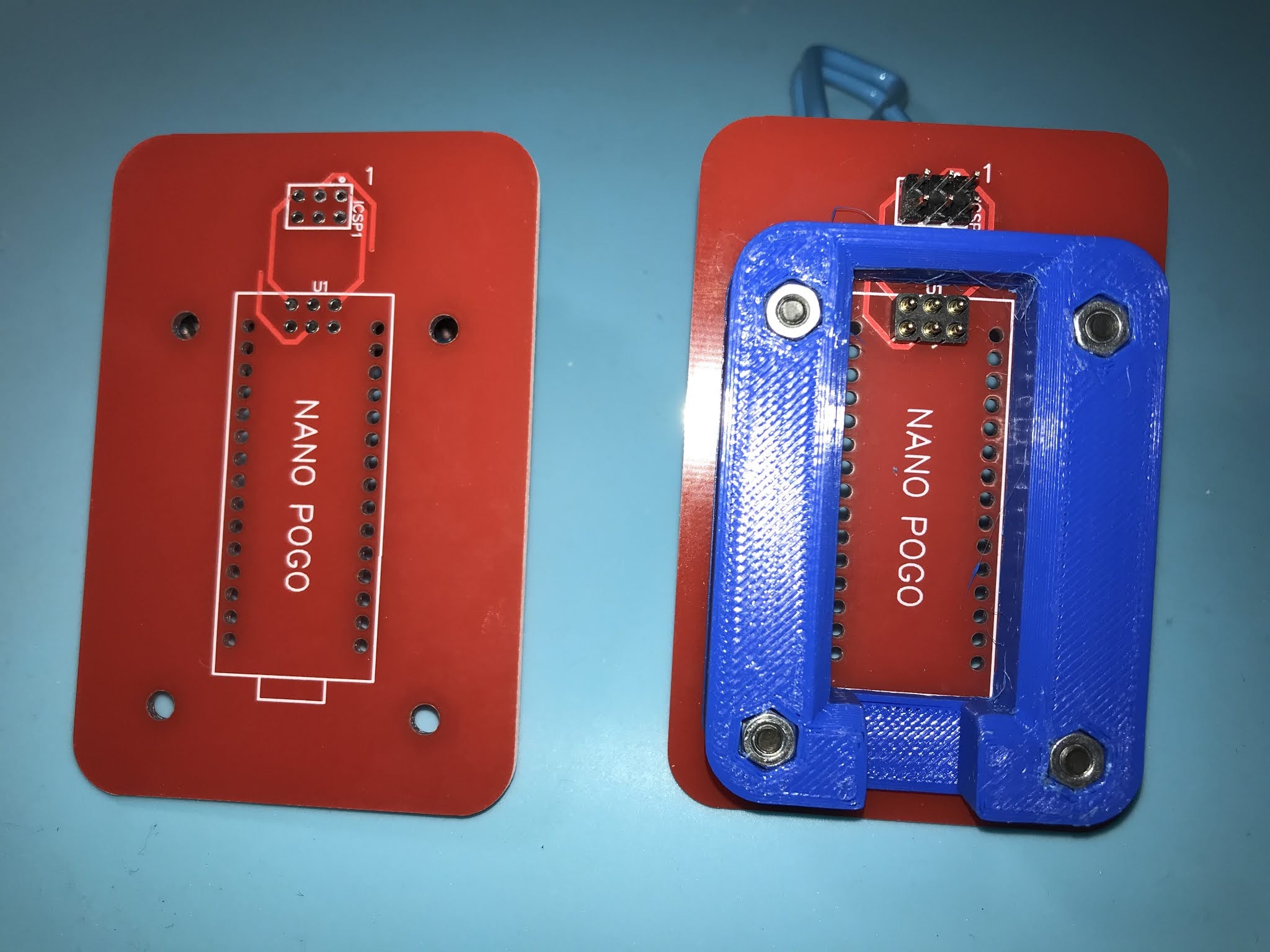
The PCB routing was very simple. I put holes to pass the Nano DIP pins through and 4 holes to attach a 3D printed guide plate. Here is the bare board and the completed fixture.


Here is the board setup to program a Nano without the header pins.


Five boards and five 2x3 spring pins cost a total of $38 including shipping. Board files can be found on the project page.

I will not need 5 of these so if you would find something like this useful let me know and I can send you a board, 3D print and spring pin for free while they last.


Sep 20, 2020

Tiny Arcade


I came across Daniel C's Tiny Joypad website recently and l really liked what he was able to do with the lowly ATtiny85 MCU. He has recreated a great assortment of video games shrunk down to fit a 1" OLED screen. These small screens use less power than one (1) regular LED. This means we can power this project with a 3 volt coin cell (CR2032) and get hours of play from one battery.

Daniel has done all the hard work on this project, supplying code and schematics, as well as linking to the Arduino core and ssd1306xled OLED library he used. The only thing I did to make my version unique was to design a PCB that looked good to me. Here is what I came up with.


I only made a couple design changes. I took out the 10k pullup resistor on the single button and just changed to INPUT_PULLUP in the code. I also duplicated the 4 pin connector so I could mount the OLED either horizontal or vertical depending on the game choice. Of course I had to change the Joystick reads to get the movements right for the vertical install. I loaded the modified Pacman code and it worked great. Boards, parts and shipping for 10 boards came to $92 or $9.20 per project. This will be a great addition to my learn to solder classes at the public library where I volunteer. Thanks Daniel C! You can see my schematics and board info on the Easy EDA project page

I will link to my modified versions of Daniel C's game code as I add them.
Pacman - side mount.


I decided to make a 3D printed case for the Tiny Arcade.


You can see more info on the case page.


Aug 1, 2020

ATtiny Simon Board

After developing the Nano Simon I decided to see what other Simon projects were around. I found this very interesting project by David johnson-Davies. He has loads of interesting info and projects on his Technoblogy website. I had never done bare chip coding before but by following his beginners tutorial I was able to start working with ATtiny85s in no time. While using the ATtiny85 does not offer much savings over the Nano clones I used in my previous Simon project, the fact that they can be powered by a coin cell and use next to no power when in sleep mode made this a project to pursue. I decided to take his excellent code and schematics and create my own version of his project. I chose a round design and added a hole so it could hang from a lanyard. I also got some self-adhesive felt circles to stick on the back to protect from the sharp bits.  


I decided to choose the unusual LED colors because of the voltage drop. I thought green and blue LEDs might have a too large of a drop and not work for the 3v operating voltage. Then again they might be fine.


I programmed the ATtiny85 chips with with a slightly modified version of David's code using the Tiny AVR Programmer from Sparkfun. The CC-BY 4.0 schematics and board info can be found on the EasyEDA project page. The cost of boards, parts, lanyard, felt and shipping was $65 for 10 boards or $6.50 each. This will be a great addition to my learn to solder board selection for my learn to solder classes.  Thank you David johnson-Davies for sharing you projects and knowledge.

Directions for Use
The game does not have an on/off switch. The ATtiny85 just goes into deep sleep unless the buttons are pushed. My battery is still good even after being on the shelf for many months.

To start the game press the center start button. The red and yellow LEDs flash for 5 seconds. During that time choose one player or two player. If you don't choose it goes back to sleep and you have to press the start button again.

The one player game works like the original Simon. The game will choose a color at random then wait for you to push a button. If correct the game adds another random color to the sequence and you have to repeat it. If you choose a wrong button the game gives a fail tone and goes to sleep. If you happen to get up to 32 in the sequence you will hear a winning tune. (I never have!)

In the two player game the first player chooses a button and hands to the second person. The second person repeats the button and adds one to the sequence. Then back to the first person who does the sequence and adds one. Play continues until one person fails.

Jul 31, 2020

Arduino Simon Project Board

I teach Arduino at the library where I volunteer. I had my intermediate class recreate the classic Simon game. They wired up the buttons, LEDs, and a buzzer on a breadboard to prove out the code. While the class is suspended during the 2020 health crisis, I decided to make a PCB of the circuit using an Arduino Nano to reduce the size. It is powered by the Nano's USB and a new game begins when you reset the Nano.


The boards worked out well and the game plays as expected. This is the Nano Simon code the students created. The cost for the Nanos, parts, boards and shipping was $75 for 10 boards or $7.50 each. You can see the public domain schematics and board info on the EasyEDA project page.

May 31, 2020

LED Follower Board

I recently received a board I designed a while back. I had it shipped the least expensive way that had tracking. It took over a month to make it here and the LCSC parts took even longer. Not sure if I will use that shipping choice again. 


I call this board a LED follower. A 555 timer IC combined with a 595 shift register IC along with some other supporting components form the circuit for this board that will light one or more LEDs pulsing up the row when the button is triggered.The circuit differs from the way the 595 is usually used (clocking in 8 serial bits then triggering the latch pin to send a 8 bits in parallel to the outputs). By tying the clock pin and latch pin together the current state of the register is displayed on each shift. Speed of the pulsing is controlled by the blue potentiometer. It can vary the speed from a little less than once a second to where the LEDs blur together.The circuit can either be a one-shot where the LEDs go dark after they hit the top or with a flip of the repeat switch it can send the top pulse back to the trigger input creating a feedback loop that shows a repeating cycle.I designed this board with a few components I had not used before. I used a resistor array that combines 8 resistors in a single package. Also, because the shift register is 5 volt, I am powering the board via micro USB. I could only find that component with surface mount connections and they are really close together. It was a bear trying to solder them but I got it done with a lot of flux and some solder wick. I only got 10 of these which is good because of the USB connector they will not be suitable for the learn to solder classes. Link to the EasyEDA project page for this board.

Update 3/15/2024: I have updated this board to get power from other sources like a USB pigtail cord. The circuit should work from 3v to 6v so other options will work too.

Apr 30, 2020

A Board for the Farm

I own and operate a small farm in Maryland, USA. We grow spring annuals in our one acre commercial greenhouse and produce about 200,000 broiler chickens per year in our commercial poultry house. I occasionally put my hobby knowledge to use on the farm. I have been known to cobble together a proto board or an Arduino with a proto shield for a project now and then, but they always looked less than professional. This may all change with this new found skill. I recently needed a way to control 3 dosing pumps with the pulse from one water meter. This seemed the perfect opportunity to make a professional level Arduino project. I am a big fan of plug-able headers and terminal connectors. Making the wire connections is so much easier when you can hold the connector in your hand. The board is rather simple with just an Arduino Nano socket along with 4 relays and an ULN2003A relay driver along with plug-able terminals for inputs and outputs. I brought out some of the unused I/O pins in case I find another use for the extra boards. Here are the boards.


The code for the project is straight forward. The water meter closes a circuit once per 10 gallons. With one dosing pump that closure would signal it to start a dose cycle. With 3 pumps I needed 3 closure circuits (3 relays). So the code just waits for the input from the water meter circuit to go high and when it does it triggers the outputs for the 3 relays through the ULN2003A. The ULN2003A takes the logic level signal from the Arduino as input and outputs the higher current needed to activate the relay coils.

The code worked great. Now to 3D print an enclosure for it....

OK so I 3D printed a box I designed in Fusion 360. It turned out alright but it did not look as professional as I wanted and would not have been sealed. 


So I decided to get this enclosure off Amazon. Here is a close-up of the board installed in the box.


The photo below shows the 3 dosing pumps that the board controls.


I mounted the board in the box with some brass hex standoffs I had sitting in a drawer. I just put a slit in a few of the 10 rubber plugs to pass the wires through. My code has the on-board pin 13 LED light when it activates the solenoids. The solid cover prevents monitoring that so I may change the code and bring out a LED wired to one of the spare I/O pins. With buying 10 boards and enough components to make 2 working boards along with the case the project cost under $50. The best part is it is open source and I can fix it if something goes wrong. By comparison I just had a technician repair the main controller for the chicken house. A power surge from a lightning strike fried 2 small PCBs. They cost $600 (no markup there!) and the labor for troubleshooting and reprogramming was $750.

Jan 14, 2020

The Adventure Begins


Hi my name is Keith Lohmeyer. My interest in electronics started in my teens but I chose a different career path. I rediscovered electronics and Arduino micro-controllers in 2013. This hobby has led to teaching teens and adults as a volunteer at our local public libraries. One of the classes that get the most attendees is the learn to solder class. In the past I ordered PCB kits from the Far East. Usually tree or heart shaped boards that have LEDs that are made to blink with some resistors, capacitors, and transistors and powered by a 9 volt battery, You can usually get the kits for less than $5 each including shipping. As of January 2025 we have had over 180 people try their hand at soldering with most leaving with a working project. We have had students from age 10 to over 80 go from no soldering experience to a completed working board they soldered themselves in a two hour class. Kind of nice to see all the smiles of accomplishment.


I follow a few electronics YouTubers. One of them is Ralph Bacon . Back in October of 2019 Ralph made a two part video called From Circuit Diagram to PCB (and part two). These videos gave me the encouragement to try designing some boards myself. 

Success on the First Try 
I have always thought 555 timers were interesting. I remembered a 555 timer book I used to have from Radio Shack. I could not find my copy but a Google search found a PDF version online. It is titled Engineer's Mini-Notebook 555 Timer IC Circuits by Forrest Mims III. With this book and some online resources including this 555 online calculator I was able to breadboard a working circuit for blinking LEDs with a 555 IC, a capacitor, and a few resistors, With my circuit diagram and Ralph's videos I designed my first board using the EasyEDA online editor. It took a while to learn to navigate the editor but I completed my first board in about 4 hours. With the direct links to JLCPCB for the boards and LCSC for the parts ordering is quick and easy. With boards at $0.50 and parts at $0.75 in lots of 10, it is quite the deal. Shipping will vary depending on how long you want to wait and if you want tracking. Here are the first boards.


The first one I soldered up worked great so I must have got the design right. I included some silkscreen graphics on the front (scallop and solder iron) and a white rectangle on the back so students can sign their work. 

Learn and Improve
While the first boards came out great I was still learning. For beginner boards I realized the capacitor lead spacing was a  little tight. Also the 9 volt leads coming from the battery holder were a little close together. I also wanted to try a custom board outline. After a little research I was able to import a dxf board outline file. I did not change the schematic or the tracks so I decided to make this a larger order with 10 boards in 4 different colors. Here are the new and improved boards. 

This is a link to the EasyEDA  project page for the first two boards. Paul from learnelectronics is another of the YouTubers I follow. He recently did an on air build of one of these boards. You can find the video at this link

Again I was quite happy with the results. Including shipping the board and parts came out to $2.40 each! Cheaper than the kits I was getting from Bangood. JLCPCB even sends out free swag with their orders.


Here are some more designs as I continue this hobby.
and more to come...